Viewing Employee Positions in Org Charts
Classic Nakisa HR Suite lets you view a specific employee position in an Org Chart. This makes it easier to view Employee Positions and their reporting structure. You can view the employee position in the following two ways:
- An Employee Search: After performing an employee search, select View in Org Chart from the context menu.
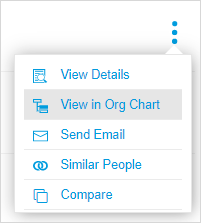
An Org Chart will open with the Employee Position node highlighted in blue.
Note: This feature is only available for users with the employee role.

|
Classic Nakisa HR Suite 2022.R2-SP1 © 2023
|
Nakisa Inc. All rights reserved worldwide. |