Exporting Your Chart to PowerPoint
Classic Nakisa HR Suite offers you the ability to configure your org chart then export it directly to a PowerPoint slide. This makes giving presentations with your HCM data quicker and easier.
To export your chart to PowerPoint:
- Open and expand your org chart as appropriate.
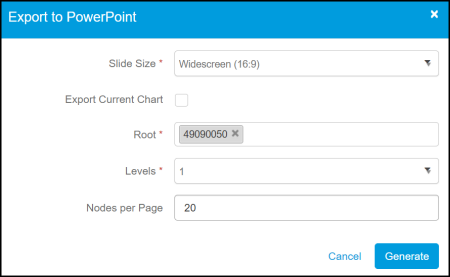
- Click Export to PowerPoint .
- Select Slide Size aspect ratio.
- Widescreen (16:9)
- Standard (4:3)
- If you want to export the entire current chart, leave the checkbox ticked and click Generate.
- (Optional) If you want to export a subset of the chart, untick the checkbox and enter:
- Root node where you want to start the chart
- Select how many levels you want to export
- Number of nodes you want to appear per page
Click Generate. A green banner appears at the bottom of the screen indicating that you will be notified when your PowerPoint is ready.
- Open the notification and click where indicated in the text to download the presentation.
Note: For exporting to work successfully, you will need to turn off the pop-up blocker for the url you use to access Classic Nakisa HR Suite.
Note: Notes and the icons indicating a node has been modified in scenarios will not appear on your PowerPoint slides.

|
Classic Nakisa HR Suite 2022.R2-SP1 © 2023
|
Nakisa Inc. All rights reserved worldwide. |