Using the Interface
Financial Organization Structure contains settings and master data for a number of Nakisa applications.
To use the interface:
- Click
 to open the main menu. The main menu allows users to access pages such as Settings, System Configuration (with master data tables, company and system configuration, and determination tables), and user security. The options available depend on the user's assigned roles.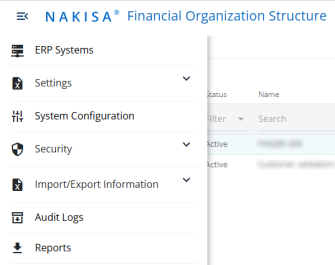
- Click
 to change the language of the application.
 - Click
 to view user information, manage user preferences, and log out of the application.
 -
Click the Nakisa AI Assistant to open the chat and ask any question about product features and how to use them. If required, you can move the Nakisa AI Assistant bar up or down, or to the other side of the screen.

|
Financial Organization Structure 2025.R2 © 2025
|
Nakisa Inc. All rights reserved worldwide. |