Revert Activation Group Versions
Once an activation group has been activated and is in "Active" status, you can revert the object back to a previous state, based on the events that were previously performed. You can also revert inception, which returns the activation group back to Define status. This can be useful if you need to exercise a forgotten term at inception, or revert an indexation event to index a missed term.
Note the following:
- This feature is only supported for lessee contracts.
- You cannot revert an activation group if a casualty event has been performed.
- For tracking purposes, you cannot callback a lease component that has a reverted activation group.
- Unit changes after activation are not tied to activation group events, and there are not changed if an event is reverted.
Activation group reverts are always based on the lease event and inception revision versions. When you revert a version, it effectively restores the activation group to the previous version. This can be thought of as a multi-level undo feature that allows you to roll back to a specific point in time. For example, if the activation group has three revision versions and you revert version two, versions two and three are reverted and the activation group returns to version one.
Rolling back an activation group version (or versions) includes undoing any changes from activation group events, such as newly exercised terms or contract rate changes, as well as reverting the financial schedules and reversing any event postings. Payment, accrual, and depreciation postings are also reversed up to the period of the reverted version (where the period is based on the inception date or the event Modification Date). Note that the unit status and charge postings are only reversed when the inception version is reverted.
Take the example below where you are reverting the second event (returning the activation group back to the version of the first event). The Event2 version was reverted, which automatically reverted Event3 and Event4. Event1 became inactive, and a copy of Event1 became the new Active version.
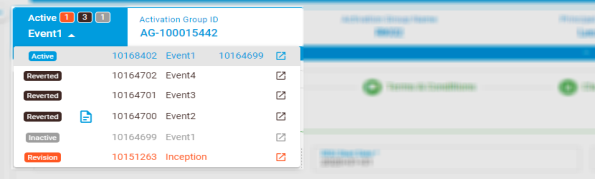
When the activation group version is reverted, the following also occur:
- Any open drafts are deleted.
- The status of any reverted versions changes to "Reverted" and the activation group header becomes black.
- The revision before the last reverted version changes to "Inactive" (with a grey header).
- A copy of the now Inactive version becomes the new Active activation group (with the same name as the copied version). This new version retains the same name as the copied version but has a unique ID. The ID of the copied version is displayed after the version name for tracking purposes.
After the revert is performed, you can view a brief report of the revert operation. You can also navigate to the Reverted versions to view a history of the activation group and a record of any reversed postings.
To revert an activation group version(s):
- Open the required activation group.
- Navigate to the left of the activation group header and select the version in Active or Revision status that you want to revert.
- Click Context Menu
 > Revert.
 - Set the Document Date and Posting Date for journal entries that are reversed during the revert.
- Select a Reversal Reason for the recognition journals.
- Click Submit. The status of the reverted version(s) changes to Reverted.
- To view a Revert Report, click
 in the object header.
 - You can click Journals to view any recognition journal entries for the reverted version.
- If required, click Cancel to cancel a revert.

|
Nakisa Lease Accounting Suite 2025.R2 © 2025
|
Nakisa Inc. All rights reserved worldwide. |