Using the Application Menu
This section identifies the key elements of the application menu.
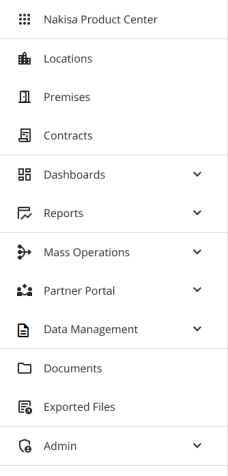
- Nakisa Product Center: The Nakisa Product Center is a global landing page that allows you to easily access resources and other Nakisa products.
- Locations: Access the summary page for your locations.
- Premises: Access the summary page for your premises.
- Contracts: Access the summary page for your contracts.
- Dashboards: The dashboards menu allows you to view and create dashboards.
- Reports: The report menu allows you to view the available reports.
- Mass Operations: The mass operations menu provides access to the following modules: Batch Management, Financial Obligation Reports, Mass Percentage Rent, and Mass CPI Indexation.
- Partner Portal: The partner portal allows associated partners to view their contracts.
- Data Management: The data management menu allows you to import and export files, as well as download exported files, including batch and percentage rent reports.
- Documents: The documents menu allows users to see all the documents they have access to, as well as export them.
- Exports: The exports option allows users to view and download exported Excel files for document exports, as well as summary page and audit log exports.
- Admin: The admin menu displays the different configurable settings available within the application.

|
Nakisa Portfolio Management Suite 2024.R3 © 2024
|
Nakisa Inc. All rights reserved worldwide. |