Full Details Pages
The full details page lists all the details associated with the node you have selected. Depending on the organization you use, the information displayed will be different.
You can favorite full detail pages by clicking the heart icon ("Add to Favorites") in the header. All your favorites are listed on the Quick Access tab in the Nakisa Product Center. To remove a favorite, just click the heart again ("Remove from Favorites").
Position Details
The full Details Page tabs are divided into the following categories:
Position Details
The position details tab lists the following information:
- Position information
- Location information
- Company information
Employee Details
The employee detail tab lists the following information:
- Employee information
- Contact information
- Self-identity information
- Performance information
Employment Details
The employment details tab list the following information:
- Employment status
- Tenure
- Employment Type
Relationships
The relationships tab lists all the reporting relationships and peers the node has. The relationships tab shows you the following relationships:
- Manager: The person or position that the node directly reports to.
- Peers: The other positions that have the same direct report.
- Direct reports (If applicable): All the employees or positions that report to the selected node.
Within each relationship section there will Relationship Nodes for each individual relationship in that section. For example, if the selected node has five peer relationships, there will be five peer nodes in that section.
Relationship Nodes
In each of the sections within the relationship tab, there are nodes for the positions that have a relation to the selected node. These nodes offer very basic information about the related node, including:
- Reporting relationship (solid or dotted)
- Position name
- Employee name
You can expand the nodes using the arrow icon to view contact information as well as access the details of that node.
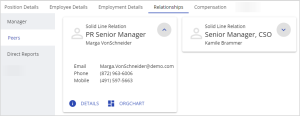
When the relationship nodes are expanded, you can select two options:
- Details: Opens the details page for the selected relation.
- Org chart: Opens an org chart with the two nodes and their reporting relationship highlighted.
Compensation
The compensation tab lists the renumeration information for the position including the annual salary and any bonuses, if applicable.
Org Unit Details
The Org Unit details tabs are divided into the following categories:
- Org Unit Details
- Manager Details
Org Unit Details
The Org Unit details tab lists the following information:
- Org Unit information
- Org Unit area information
Manager Details
The manager details displayed the Org Unit manager or managers as a relationship node. These nodes offer very basic information about the related node, including:
- Reporting relationship (solid or dotted)
- Position name
- Employee name
If the node has multiple incumbents you will be able to switch between them using the drop down menu at the top of the page.
The nodes also give you access to the following:
- Details: Opens the position details page for the selected relation.
- Org chart: Opens an org chart with the position highlighted within the Org Unit.

|
Nakisa Workforce Planning Portfolio 2025.R2 © 2025 |
Nakisa Inc. All rights reserved worldwide. |