Create a Sub Plan
Once a headcount plan is created, you can create a sub plan within it.
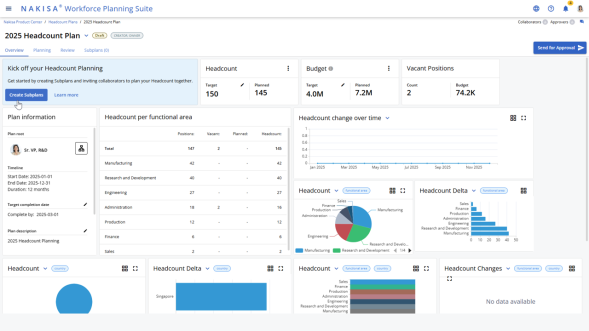
To create a sub plan:
- In the headcount plan, click Create Sub Plan.
- In the sub plan creation window, complete the following fields:
- Source Plan (if applicable)
- Sub Plan Name
- Owner
- Click Create.
After the sub plan is created, the application displays the overview page of the manager's organization. The executive user can view planning charts by headcount or budget and set targets specific to the sub plan. When a sub plan is assigned to a manager, they are notified in the application.
To review a sub plan:
- Navigate to My Plans.
- Click on the assigned sub plan to view the Overview page.
- Review the plan information, including:
- Objectives
- Targets
- Key metrics

|
Nakisa Workforce Planning Portfolio 2025.R2 © 2025 |
Nakisa Inc. All rights reserved worldwide. |