Create a Scenario
Creating a scenario is the first step in planning changes to your organization. Use a scenario to define the structure, objectives, and collaborators involved in your strategic planning process.
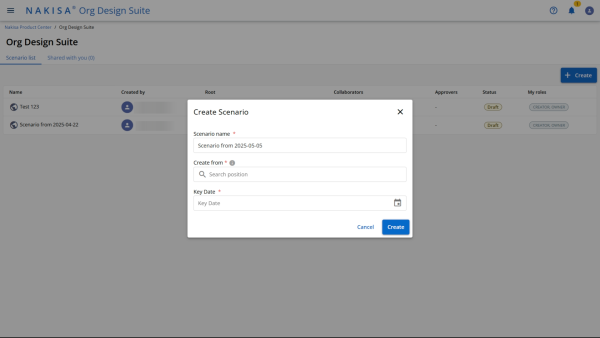
Access Your Workspace
- From the landing page, you can view all scenarios you have created.
- To begin creating a new scenario click the Create Scenario button in the top toolbar of your workspace.
Define Scenario Details
In the Create Scenario dialog:
- Title: Enter a clear, descriptive name for the scenario.
Example: "Q4 Sales Reorganization"
- Root Position: Search for and select the root position from which the scenario will branch.
Tip: Use the position name to search efficiently.
- Key Date: Select a date to represent when the organizational changes are expected to take effect.
Validation: The selected date must not be in the past.
Click Create to proceed.
Once the scenario is created, you will be redirected to the Scenario Overview page.
Add Description and Objectives
On the Overview page, you will see the scenario’s name, creation date, and the organizational root.
To provide more context:
- Click the pencil icon next to the Description section.
- Enter a brief explanation of the scenario’s purpose.
- Outline the Objectives to define key outcomes or strategic goals for the reorganization.
Providing objectives helps collaborators understand the intent behind the changes.
Add Collaborators
To invite others to view or contribute to the scenario:
- Click the Collaborator button in the toolbar.
- Use the search bar to find and add users.
- For each user added, define their Access Rights:
- View: Can see the scenario but cannot make changes.
- Edit: Can make changes to the scenario content.
- Click Save once collaborators are added.
Collaborators will be notified and will have access according to the permissions you’ve assigned.
Next Steps
Once the scenario is defined and collaborators are assigned, you can proceed to designing the organizational structure, tagging roles, analyzing metrics, and simulating changes.

|
Nakisa Workforce Planning Portfolio 2025.R3 © 2025 |
Nakisa Inc. All rights reserved worldwide. |