Related Tables
Certain tables require you to attach entries that you want to associate with other related tables. For example, attaching business units or GL accounts to a company. These related tables are displayed at the bottom of the screen. Clicking on an entry in the current table displays the attached entries in the related tables below. In the example below, the business unit 001 is attached to the company AA.
The  icons indicate that you can attach directly from the current table. If these icons are not present, you must navigate to the related table to attach the entries.
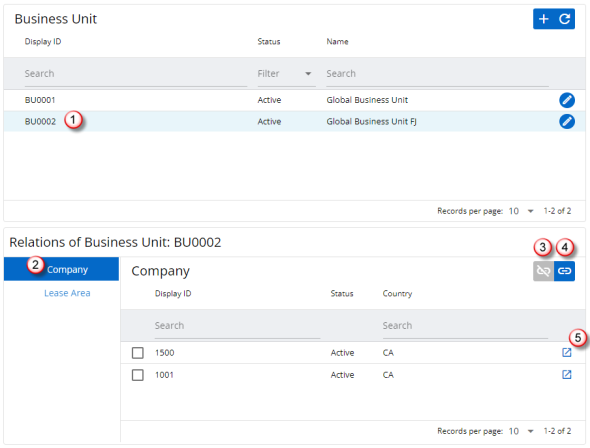
- Selecting an entry in this table displays the attached entries in the related tables below.
- The list of related tables are displayed here. Click on the required table to display it on the page.
- To detach entries, select the required entry and click this icon.
- Click here to attach new entries.
- Click here to open the related table in a new tab with preset filters applied.

|
Financial Organization Structure 2026.R1 © 2026
|
Nakisa Inc. All rights reserved worldwide. |