Using the Application Menu
This section identifies the key elements of the application menu.
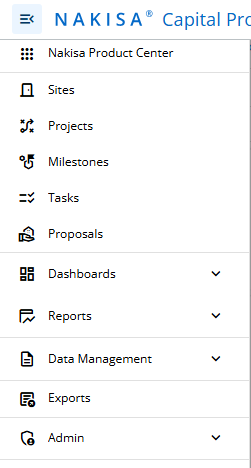
- Nakisa Product Center: This menu item opens the global landing page, Nakisa Product Center.
- Sites: This menu allows you to view the summary pages for sites.
- Projects: This menu allows you to view the summary pages for projects.
- Milestones: This menu allows you to view the summary pages for milestones.
- Tasks: This menu allows you to view the summary pages for tasks.
- Proposals: This menu allows you to view the summary pages for proposals.
- Dashboards: The dashboards menu allows you to view the available dashboards.
- Reports: The report menu allows you to view the available reports.
- Data Management: The data management menu allows you to manage data imports, exports, and templates.
- Exports: The exports option allows users to view and download exported Excel files.
- Admin: The admin menu displays the different configurable settings available within the application.

|
Nakisa Capital Projects 2026.R1 © 2026
|
Nakisa Inc. All rights reserved worldwide. |