Review Scenario Changes Report
The Change Report provides a detailed summary of all modifications made within a scenario. It captures every org unit, position, and employee change—such as additions, deletions, moves, and updates—along with the before and after values. This allows you to easily review and validate all updates made to your scenario.
Review Scenario Changes
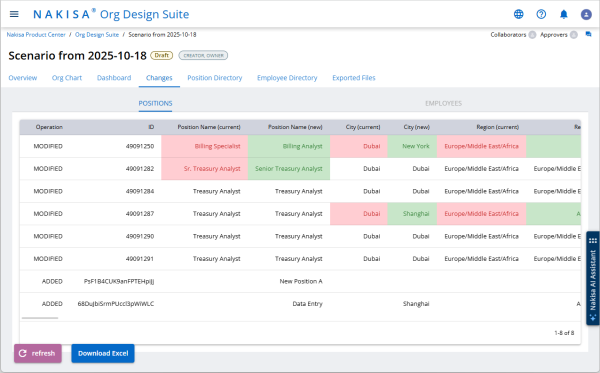
Once you have created a scenario and made structural or employee updates in the Org Chart tab, you can review them in the Changes tab.
The Change Report is divided into multiple sections:
- Position: Lists all position-related field and relationship changes.
- Employee: Lists all employee-related changes.
- Org units: Lists all org unit-related changes (in a scenario for org unit reporting structure)
Each section includes:
- Operation Type — Indicates whether the record was Added, Modified, or Deleted.
- Editable Fields — Shows both the previous and new values side by side.
- Field Details — Displays text and IDs for all relevant fields, ensuring accuracy and clarity.
- Color Highlights — Changes are visually identified with red and green highlights so you can quickly spot updates.
For example, if a position title was edited, the report shows both the old and new values in the same row, with the modified field highlighted.
Relationship changes, such as moving a position to a different parent, appear as “Modified” operations. The report displays both the current and new parent IDs and names, providing a clear view of how the hierarchy has changed.
The same layout applies to the Employee tab, which lists updates such as new hires or removed employees using the same logic and visual cues.
Export Scenario Changes
To share or analyze changes outside of the application, you can export the report to Excel as follows:
- Open the Changes tab in your scenario.
- Click Download Excel at the bottom of the screen.
The report is generated as an Excel workbook and downloaded through your browser.
The exported file contains two or three worksheets (Position, Employee, Orgunit) which mirror the in-app Change Report. Each worksheet includes the same operation types, field comparisons, and highlights as displayed in the application.

|
Nakisa Strategic Org Design 2026.R1 © 2026 |
Nakisa Inc. All rights reserved worldwide. |