Succession Planning
You can use Classic Nakisa HR Suite for succession planning. Succession planning lets you create a group potential immediate replacements for a position, should it become available.
To Assign Successor Employees to Positions
- Open the details panel for the position(s) you want to assign the successor to and click Assign New Successor.
- Use the drop-down menus to enter the Successor information and click Assign
- Employee - Search for the employee to add as a successor.
- Ranking - The ranking of the employees in the pool in regard to taking over the position.
- Readiness - How ready the employee is to take over the position.
- Click Assign New Successor.
- Click Submit to confirm your selection. The selected employee will appear as an incumbent in the position.
Alternately, you can add a successor to a position through the Position Node Menu by selecting Assign New Successor.
If there is more than one person successor for a position, you can Compare the employees, if desired.
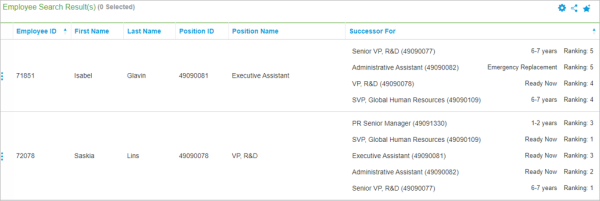
The successor and succession information can also be found by performing a Searching. You can search for the succession information by either position of employee. The results will display all the successor information including:
- Ranking
- Readiness
- Successor Positions (Employe search)
- Successor (Position search)
Note: An employee can be assigned as a successor for the same position multiple times. Be sure to delete any invalid duplicates to avoid confusion.

|
Classic Nakisa HR Suite 2022.R2-SP1 © 2023
|
Nakisa Inc. All rights reserved worldwide. |