View an Org Chart
Organizational charts (org charts) graphically show the hierarchical authority, roles and responsibilities, and relationships in an organization. The org chart is made up of nodes that contain quick and customizable information about the position, employee or Org Unit you are viewing. The information is dependent on which type of reporting structure you use and the user role access you have.
To view the org chart, click the org chart icon  in the main menu. The org chart displays all employees and information you are allowed to see based on your user role access.
By default, the org chart is displayed collapsed, with only the high level parent nodes displayed. To see how many child nodes a parent has, hover over the node and the number appears below the node, in a blue box.
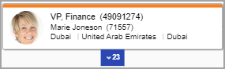
You can expand and collapse the child nodes by clicking the child node number box. When you expand a group of child nodes, the org chart centers on that expanded group.
You can identify orphaned nodes and will receive a notification indicating the node is not present under the organization's root.
For more information about using nodes, see the Context Menu.
Multiple Incumbents
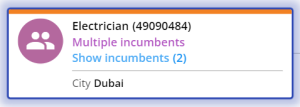
Position nodes can have multiple incumbents. These nodes will be be identifyable as they will say Multiple Incumbents. You will also have the ability to display or hide the incumbets on the node. Click Show Incumbents or Hide Incumbents to list the names of the employes that are assigned to the position.
Dotted Relationships
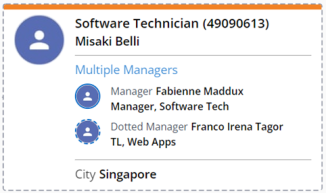
Nakisa Org Chart Suite allows to view the different relationships your organization may have. Along with solid line reporting, Org Chart Suite also shows dotted relationships. Dotted relationships are represented in the Org chart by dotted lines connecting the parent and child nodes. The child node will also have a dotted boarder. Note that second dotted line relationships are indicated by a dash-dot line.
Inside the node, you will be able to see the list of managers the child has and what type of relationship they have. A dotted manager will have an avatar that has a dotted boarder to signify the relationship type.

|
Nakisa Workforce Planning Portfolio 2025.R3 © 2025 |
Nakisa Inc. All rights reserved worldwide. |