Connecting with Your Coworkers
Nakisa HR Suite allows you to easily connect with your coworkers using email or your organization's chat application.
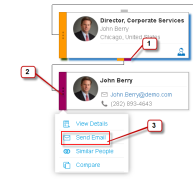
To email your coworker from the org chart:
- Search for your coworker using Quick Search or navigate within the org chart to find your coworker.
- Click the node menu of your coworker and select Send Email or click on the email link on the node itself.
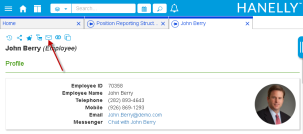
To email your coworker from the Details Panel:
- Search for your coworker using Quick Search or navigate within the org chart to find your coworker.
- Open your coworker's Details Panel by clicking on the employee node.
- Click the email link in your coworker's Profile or click the Send Email icon
 in the menu.
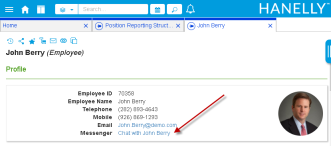
To send your coworker an instant message from the Details Panel
- Search for your coworker using Quick Search or navigate within the org chart to find your coworker.
- Open your coworker's Details Panel by clicking on the employee node.
- Click the Messenger link in your coworker's Profile. This will open your organization's messaging client with your coworker selected as the recipient.

|
Nakisa HR Suite 2022.R2 © 2022
|
Nakisa Inc. All rights reserved worldwide. |