Landing/Home Page
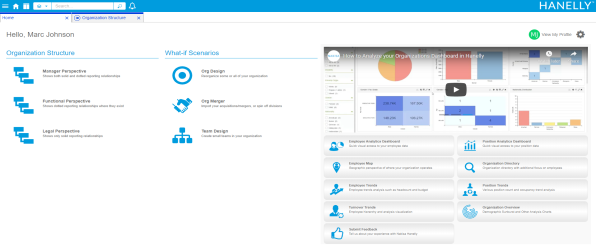
Depending on how your Nakisa HR Suite administrators configured your environment, the first page you see upon logging in may be the landing page (which may also be considered the Home tab). This page provides you one-click access to the most commonly used elements of your Nakisa HR Suite environment. The objects you see on this page will be determined by your environment and your role. You can drag and drop the following sections on the page to suit your preferences.
Organization Structure
This section opens your organization chart in the perspective of your choosing. Your options are Manager, Functional, and Legal.
What-if Scenarios
This section opens scenarios that you have created based on your organization. You can select Org Designs, Org Mergers, or Team Designs.
Video Playlist and Analytics
In addition to some helpful "how-to" videos on how to use some of the most popular features in Nakisa HR Suite, you can use this section to access the analytics for your organization. You can view your Organization Directory, which is a list of all of the employees in the company.
View My Profile
Clicking the link in the upper right corner to access your own Employee details panel, where you may have the option of adding information to the Social section of your profile.
Change My Preferences
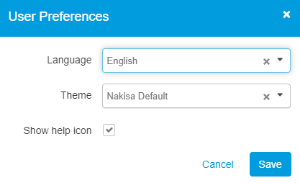
Clicking the preferences icon  to the top right opens the My Preferences options. You can modify the following options:
- Language
- Theme
- Show help icon

|
Nakisa HR Suite 2022.R2 © 2022
|
Nakisa Inc. All rights reserved worldwide. |